“DNS Authentication: DMARC Fail” in Mimecast: What It Means and How to Fix It
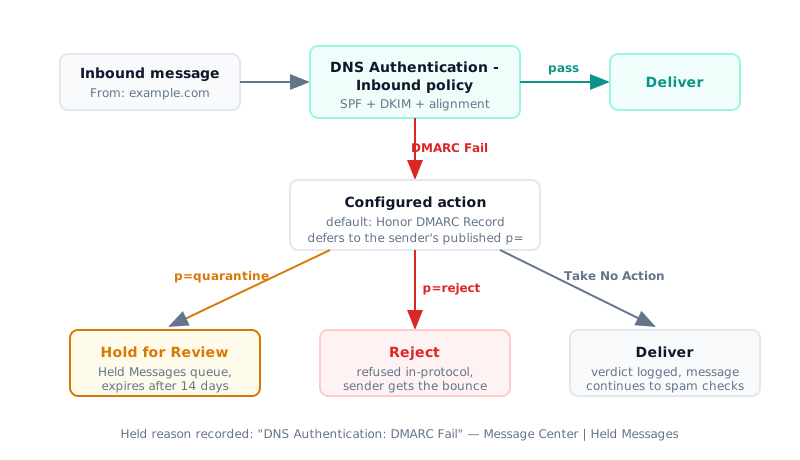
“DNS Authentication: DMARC Fail” is the held-reason string Mimecast records when an inbound message’s From domain fails DMARC — neither SPF nor DKIM both passed and aligned with the visible From address — and the configured action (default: “Honor DMARC Record”) held or rejected it.
This guide serves both seats. If you administer Mimecast and inbound mail is being held, start at diagnosing the hold in the console. If your outbound mail is failing at Mimecast-protected recipients, jump to the sender-side fix. For failure causes that aren’t Mimecast-specific, start with the general checklist in why DMARC fails and how to fix it — this guide covers the Mimecast-specific path.
Either way, the fix starts in the message’s Authentication-Results header:
dkim=fail (body hash did not verify) points to content modified in transit,
while spf=pass with dmarc=fail points to an alignment gap. Fix the sender’s
alignment at the source, or add a tightly scoped DNS Authentication exception —
never a blanket Permitted Sender, which does not bypass DMARC. And take your
time: held mail is retained for 14 days and releasable by an administrator, so
nothing is lost while you diagnose.
What Does “DNS Authentication: DMARC Fail” Mean in Mimecast?
A DMARC fail in Mimecast is an inbound gateway verdict, not a bug report. It appears in the Administration Console under Message Center | Held Messages, in the Held Reason column, whenever a DNS Authentication - Inbound policy evaluates DMARC for an arriving message and the result is Fail (Mimecast KB article 34000340541587, updated 2026-04-22).
The string often carries a parenthetical sub-result, and decoding it is where most troubleshooting time is won or lost:
| Held reason | What it actually says |
|---|---|
DNS Authentication: DMARC Fail (SPF: ALLOW / DKIM: UNKNOWN) | SPF passed but for a domain that doesn’t align with the From domain; DKIM was absent or unverifiable. DMARC fails on alignment. |
DNS Authentication: DMARC Fail (SPF: DENY / DKIM: ALLOW) | SPF failed outright; DKIM verified but its d= domain doesn’t align with the From domain. |
DNS Authentication: SPF Fail / DNS Authentication: DKIM Fail | Separate held reasons entirely — the single-protocol checks, logged distinctly from the DMARC verdict. |
The recommended action for a DMARC Fail result is Honor DMARC Record, which
defers to the sender’s published policy: p=quarantine sends the message to the
Hold for Review queue, p=reject rejects it in-protocol. That means the hold is
often correct behavior — the sending domain asked receivers to quarantine
unaligned mail, and Mimecast complied.
Two operational facts shape your response window. Held messages remain in the queue for 14 days before they expire and are archived (Mimecast KB “Held Messages - Monitoring”, updated 2025-02-26). And a DMARC-failed hold is released by an administrator — end-user Personal On Hold covers spam, attachment, and content-examination holds, not DNS Authentication. Mimecast’s Personal Portal documentation and the University of Sussex ITS FAQ 2975 both reflect this split, so route release requests to an admin rather than telling users to check their personal hold queue.
Alignment itself is defined by RFC 9989 (DMARCbis, published May 2026, which obsoletes RFC 7489). Relaxed alignment is the default: the authenticated domain and the From domain need only share an Organizational Domain, determined since DMARCbis by a DNS Tree Walk rather than the Public Suffix List (RFC 9989 §3.2.10, §4.10). The mechanics of how DMARC evaluates SPF and DKIM alignment are unchanged by Mimecast — the gateway is just the referee.
Legitimate mail fails this referee more often than admins expect.
38% / 29% / 14% of DMARC-failing legitimate mail traces to SPF misconfiguration, forwarding and mailing-list breakage, and DKIM key or selector issues, respectively
How Do I Diagnose a DMARC Hold in the Mimecast Console?
Diagnosis in Mimecast DMARC troubleshooting takes two console stops, then one header read. The held message is retained and releasable throughout, so you can work through this in order.
- Message Center → Held Messages. The Held Queue tab groups messages by held reason; confirm the reason is the DMARC string and not the separate SPF or DKIM strings.
- Message Tracking → Message Details → Analysis tab. Per Mimecast’s documentation, the Analysis tab “shows the processing steps and provides the results of how an email has been assessed at each stage” (Mimecast KB “Message Tracking - Analysis Tab”) — including which policy action fired.
- Read the
Authentication-Resultsheader. This is the decision fork:
| Header evidence | Root cause | Your move |
|---|---|---|
dkim=fail (body hash did not verify) | Message modified in transit — a forwarder or upstream gateway | Fix belongs at the modifying hop, not your policy |
spf=pass + dmarc=fail | Alignment gap: Return-Path domain ≠ From domain | Sender must align SPF or DKIM with the From domain |
dkim=none + spf=fail + dmarc=fail, unfamiliar IP | Likely spoofing | Do not release; do not permit. Unsure? Leave it held — expiry is the safe default |
Here is the alignment-gap case as it appears in a real header — SPF passes for the bulk-sender’s Return-Path domain, but nothing aligns with the From domain:
Authentication-Results: mimecast.com;
    spf=pass (spfCheck: domain of bounce.mailvendor.net designates
      198.51.100.24 as permitted sender) client-ip=198.51.100.24;
    envelope-from=bounces@bounce.mailvendor.net;
    dkim=pass header.i=@mailvendor.net;
    dmarc=fail (p=quarantine dis=quarantine) header.from=example.com
And the body-hash case, the fingerprint of a hop that altered signed content after signing:
Authentication-Results: mimecast.com;
    spf=fail (sender IP is 203.0.113.77)
    smtp.mailfrom=relay.forwarder.example;
    dkim=fail (body hash did not verify) header.d=example.com;
    dmarc=fail action=quarantine header.from=example.com
If you’d rather not eyeball raw headers, paste them into a
free email header analyzer to get the SPF,
DKIM, and DMARC verdicts decoded line by line — including which DKIM d=
domain signed and whether it aligns.
Diagnose before you touch configuration. The two failure modes above demand opposite fixes, and applying the wrong one wastes days of back-and-forth with the sender.
Why Doesn’t Permitted Senders Fix a DMARC Fail?
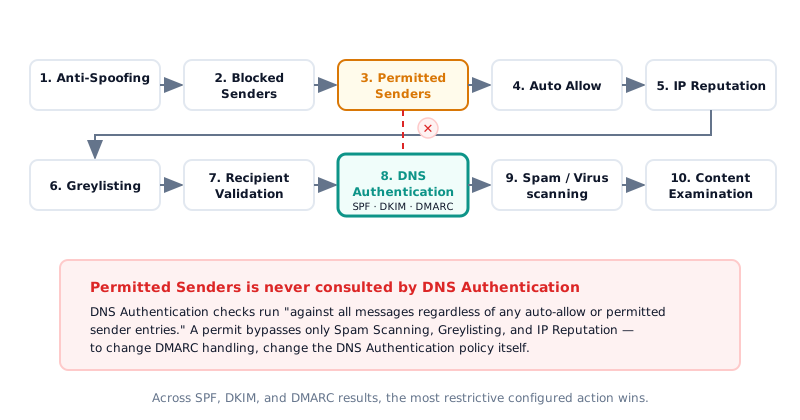
This is the single most common dead end, so it deserves a boxed correction:
The inbound order of operations explains why. Mimecast evaluates: Anti-Spoofing → Blocked Senders → Permitted Senders → Auto Allow → IP Reputation → Greylisting → Recipient Validation → DNS Authentication → Spam/Virus scanning → Content Examination. DNS Authentication runs after the permit lists and is unaffected by them, and across the SPF, DKIM, and DMARC results the most restrictive configured action wins — Mimecast’s own example rejects a message on an SPF Hard Fail action even though DMARC also failed.
It goes further than “doesn’t help”: the Ignore Managed/Permitted Sender Entries action actively cancels a permit when authentication fails, pushing the message back through spam evaluation. A permit is not a shield against DNS Authentication; under that action it is a casualty of it.
One documented quirk cuts the other way. If a message qualifies for a DMARC hold
but also has an SPF failure, the Spam Scanning policy takes precedence and the
message may be delivered despite failing DMARC from a p=quarantine domain
— a known limitation Mimecast logged in April 2023 and describes as “not on the
Product Team Roadmap to resolve.” If you see DMARC-failing mail arriving instead
of holding, check whether this precedence rule fired before assuming your policy
is broken.
When Is a Mimecast DMARC Bypass Safe?
There is no dedicated “DNS Authentication Bypass” policy type. The documented
exemption path is a scoped DNS Authentication - Inbound policy whose
definition takes no action, applied narrowly: scoped by Source IP (a /32 for a
single sending host is the right shape) and/or email domain, with Policy
Override enabled so it wins specificity, and time-boxed with a Date Range
rather than left perpetual.
The scoping rules come straight from Mimecast’s own guidance (“Common pitfalls in Mimecast email security configurations”, Mimecast blog, 2026-03-10):
- Never a From-address-only permit — Mimecast would accept that address from anywhere.
- Never a whole domain, and never broad cloud-provider IP ranges — “adding entire domains or IP ranges for cloud providers can let malicious emails from those platforms bypass your security.”
- Never your own internal domains — that hands attackers an internal-spoofing lane.
The evidence for restraint here is documented incident history, not hypotheticals. In 2024, Guardio Labs’ “EchoSpoofing” research showed attackers exploiting a tenant-agnostic Microsoft 365 allow-list option in Proofpoint deployments to relay an average of 3 million perfectly spoofed emails per day, peaking at 14 million (The Hacker News, 2024-07-29). In 2025, Varonis documented abuse of Exchange Online’s Direct Send feature to slip spoofed internal-looking mail past third-party gateways at more than 70 organizations. Both incidents share one root: allow-list scope broader than the sender it was meant to serve.
Treat the bypass as a bridge. Define exit criteria when you create it: the sender commits to a remediation date, you re-test when they report done, and you remove the policy the moment their aligned SPF or DKIM passes. Keep an audit log of every active bypass and review it on a schedule.
14.9% / 2.5% of 73.3 million sampled domains publish at least p=none, and enforce p=reject, respectively — as of December 2025
The senders who do enforce are asking you to honor their policy — a scoped, temporary exception is the respectful way to disagree.
For senders → your mail is being held or rejected by a recipient using Mimecast — you’re in the right place.
Why Is My Mail Failing DMARC at Mimecast Recipients?
Now the other seat: your legitimate mail is being held or rejected, but only at recipients behind Mimecast. The evidence is the same — you just read it from the sender’s side.
Ask the recipient for the bounce, or for the Postmaster notification their users see (“This message triggered content policies” with “DNS Authentication: DMARC Fail” listed under Policies Triggered, per the University of Sussex ITS FAQ 2975). Then map the header verdicts exactly as in the admin table above. Note that under RFC 9989, relaxed alignment remains the default and organizational domains are resolved by the DNS Tree Walk — if you send from deep subdomains, confirm your alignment assumptions against the current spec, not the obsoleted RFC 7489 behavior.
Fix in this order:
- DKIM alignment first — it survives forwarding. Any third-party service
sending as you must sign with
d=set to your From domain, not the vendor’s. This is the durable fix; the full walkthrough is in fixing DKIM alignment failures. - SPF: authorize the relay that actually delivers. If you relay outbound
mail through Mimecast, use your regional include rather than the global one.
include:_netblocks.mimecast.comresolves to 8 regional includes and costs 9 DNS lookups against SPF’s 10-lookup limit (RFC 7208 §4.6.4), while a regional record such asinclude:eu._netblocks.mimecast.comcontains onlyip4:mechanisms and costs 1 lookup. Mimecast also documents that its include should be listed first (Mimecast KB article 34000734400019, updated 2026-06-02). - Verify before you ask for a re-test. Run a check on your DMARC record to confirm the policy, alignment modes, and reporting addresses you think you published are what resolvers actually see.
Two Mimecast quirks are worth naming because they generate “but it works everywhere else” tickets. First, Mimecast evaluates SPF once against the envelope From and does not re-evaluate at the header level, so a recipient running two DNS Authentication policies with different address bases can produce failures that other receivers never surface (KB 34000734400019). Second, “ask them to safelist us” is not a durable fix — as shown above, permits don’t touch DNS Authentication. The right model is the one practitioners keep converging on: fix authentication at the source so every receiver passes you, not just the one you negotiated with. Every one of these failures also lands in your DMARC aggregate reports, which is where you see them across every receiver rather than one gateway at a time.
Mimecast in Front of Microsoft 365: Fixing Downstream DMARC Failures
The hybrid topology hits both seats at once. Mimecast unpacks and repacks every
message it processes — URL rewriting, disclaimers, attachment handling — and its
own documentation is candid about the consequence: “like other intermediatory
services, our presence will have broken DKIM and SPF” (Mimecast KB “DMARC
Analyzer - Authenticated Received Chain”, article 34000599190291). So a message
can pass DMARC at Mimecast, then re-fail at Microsoft 365’s next-hop evaluation
with dkim=fail (body hash did not verify) and SPF misalignment against
Mimecast’s relay IPs.
Two fixes, applied together, resolve it without weakening the gateway.
Fix 1 — trust Mimecast’s ARC seal. Mimecast ARC-seals processed mail with
dkim.mimecast.com — the d= value in its ARC-Seal: header and the
trusted-sealer domain the same KB article names. Confirm the d= on a message
that came through Mimecast, then tell Microsoft 365 to trust that sealer.
Email Security Cloud Integrated registers it automatically (rollout began
2024-03-13); Cloud Gateway tenants run this:
# -ArcTrustedSealers replaces the whole list, so append to what is there.
$sealers = @(Get-ArcConfig | Select-Object -ExpandProperty ArcTrustedSealers)
$sealers += "dkim.mimecast.com"
Set-ArcConfig -Identity Default -ArcTrustedSealers $sealers
-ArcTrustedSealers replaces the tenant’s whole list, which is why the recipe
appends. Microsoft documents up to 30 minutes for the change to take effect;
verify success in the downstream headers, where the ARC evaluation surfaces as
oda=1 and compauth=pass reason=130 in Microsoft’s Authentication-Results.
Fix 2 — Enhanced Filtering for Connectors. Skip-list Mimecast’s IP ranges
at security.microsoft.com/skiplisting so Exchange Online attributes mail to
the true source IP instead of the gateway; Microsoft documents that this “not
only preserves the IP address from the previous hop but also intelligently
recovers from DKIM signature failures”
(Microsoft Learn, “Enhanced filtering for connectors in Exchange Online”,
updated 2026-03-12). After enabling it, remove any mail-flow rule that sets SCL
to -1 for that connector, and lock Microsoft 365 inbound to Mimecast’s IP ranges
so senders can’t reach Exchange Online Protection directly.
One asymmetry to keep straight: ARC helps downstream of Mimecast, not upstream. Mimecast ignores ARC entries on mail it receives — “any configured Inbound DNS Authentication policies are applied using the information from the previous hop” (KB 34000734400019) — so an upstream forwarder’s ARC seal will not rescue a message from the DMARC hold queue.
Google Workspace behind Mimecast follows the same shape: configure Workspace’s Inbound gateway setting with Mimecast’s IP ranges so Workspace stops re-evaluating SPF and DKIM on mail the gateway already processed and modified.
FAQ
How do I fix DMARC authentication failure?
Read the Authentication-Results header first. A dkim=fail (body hash did not verify) result means the content was modified in transit; spf=pass with
dmarc=fail means an alignment gap between the Return-Path and From domains.
Fix the sender’s SPF or DKIM alignment at the source, and use a bypass only when
scoped and temporary.
What is a DNS authentication DMARC fail?
It is the held-reason string Mimecast records when an inbound message’s From domain fails DMARC under a DNS Authentication - Inbound policy. The configured action — by default, honoring the sender’s published DMARC policy — then held the message for review or rejected it.
What does DMARC fail mean in Mimecast?
It means neither SPF nor DKIM both passed and aligned with the visible From domain of the inbound message. Mimecast logs SPF and DKIM failures as separate held-reason strings, so a DMARC fail specifically indicates the combined alignment check failed, not just one underlying protocol.
How do I enable DMARC in Mimecast?
Create a DNS Authentication - Inbound definition with “Verify DMARC for Inbound Mail” enabled and an action assigned to each result — Mimecast recommends “Honor DMARC Record” for the Fail result. Then apply the definition through a DNS Authentication - Inbound policy, per Mimecast KB article 34000340541587.
The Fix, End to End
A DNS authentication DMARC fail in Mimecast is an inbound verdict, and it usually means the gateway did exactly what the sending domain’s policy asked. Diagnose in the headers before touching configuration: body-hash failures point at a modifying hop, alignment gaps point at the sender’s DNS. Fix at the source — aligned DKIM first, then SPF — and reach for a bypass only when it is IP-scoped, time-boxed, and logged. When Mimecast fronts Microsoft 365, trust the ARC seal and enable Enhanced Filtering so one gateway’s necessary modifications don’t become the next hop’s false positive.